Preface
AWS announced the general availability of the AWS MCP Server on May 6, 2026. It is a managed remote Model Context Protocol (MCP) server.
An MCP server exposes certain tools/functions and lets your AI agent call them. It extends your AI agent’s capabilities. The AWS MCP Server makes this possible for coding assistants such as Claude Code, Kiro and Cursor to retrieve current AWS documentation, make AWS API calls using the IAM credentials supplied by the user, and provide guidance through skills. Those tools can be used for tasks such as retrieving account information or creating an EC2 instance.
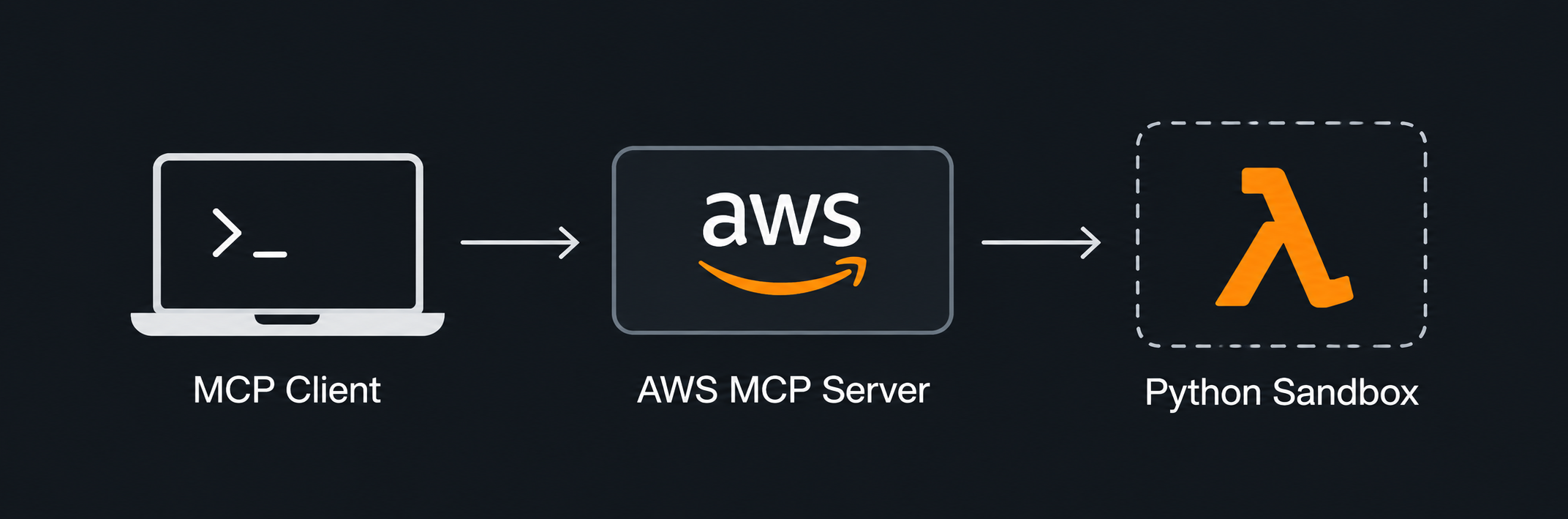
AWS’s MCP server provides a tool called aws___run_script. This tool accepts a short Python script as an argument and runs it in a server-side sandbox. Its purpose is to let an agent combine multiple AWS API calls, filter the responses and process the result in one request programatically, instead of making several separate calls.
The idea of user-supplied Python code executing inside an AWS managed sandboxed environment is interesting!
aws___run_script runs the supplied code in an AWS Lambda sandbox. The sandbox restricts imports, builtins, attribute access and file operations.
In this blog, I explain how I bypassed those Python restrictions and reached system command execution inside the Lambda environment.
I performed this research collaboratively with Claude Opus 4.6.
Discovery
Normally connecting the MCP server to Cursor or any other agent adds friction for security testing because your payloads have to pass through the AI agent which then invokes the tools. While it is fine for a while, but later it becomes a pain when your payloads starts become overly chaotic. So I quickly created a Python CLI as an MCP client that could let me enumerate the server’s tools and invoke them. The client used mcp-proxy-for-aws, which signed requests with my local AWS credentials. I created a test IAM user in my AWS account with limited permissions for this assessment.
This made it possible to send controlled inputs to each tool and examine the returned results. Although the Python code ran inside the Lambda, dangerous Python code was immediately blocked due to the custom sandbox implemented, to prevent code execution inside the Lambda runtime. I wanted to find out what actually prevented it from reaching the process, filesystem or environment beneath the Python sandbox.
Understanding the Sandbox
The submitted code passed through two layers of protection.
Firstly, a static validator inspected the code’s Abstract Syntax Tree (AST). An AST is a structured representation of source code. ASTs are used widely in compilers, code interpreters, linters, etc. An AST is a data structure containing the structural logic of the code such as imports, calls, attribute reads and assignments. The validator in the sandbox used AST to parse the Python script passed into aws___run_script to reject certain malicious looking operations before the code gets executed.
Secondly, a runtime layer replaced builtins with restricted implementations or proxy objects. In this context, a proxy is a replacement object that acts like the original object but limits how it can be used. For example, instead of the real type(), the script gets _safe_type() which returns restricted proxy classes that block access to sensitive attributes. The sandbox also limited open() to control file access.
For example, reading sensitive attributes through obj.__class__ was blocked. The getattr() builtin was also blocked, as was importing operator to call operator.attrgetter().
getattr() is simply another way to read an attribute. In normal Python, two lines produce the same output:
from types import SimpleNamespace

person = SimpleNamespace(name="John Doe", age=900)

print(person.name)  # John Doe
print(getattr(person, "name")) # John Doe
They both read name from person. When the attribute name is determined at runtime, getattr() is useful, as the attribute name can be passed as a string.
The sandbox covered both of these common forms of attribute access. It did not account for structural pattern matching.
The Flaw: Attribute Reads Hidden in a Pattern
Python 3.10 introduced structural pattern matching through match/case. It checks whether a value fits a pattern and can bind parts of that value to names.
A class pattern first checks an object’s type, then reads attributes from it. Here is an example:
from collections import namedtuple

Coordinate = namedtuple("Coordinate", ["x", "y"])
location = Coordinate(10, 20)

match location:
    case Coordinate(horizontal, vertical):
        print(horizontal, vertical)
This would print 10 20.
Python decides which attributes go into horizontal and vertical by looking at __match_args__ on the class.
print(Coordinate.__match_args__) # ('x', 'y')
Names wrapped in double underscores are often called dunder names (dunder comes from double underscore). They are special names used by Python’s object model.
For the Coordinate class, __match_args__ contains:
("x", "y")
So the first position in the pattern reads x and the second reads y. This tuple can be changed:
Coordinate.__match_args__ = ("y", "x")
With that change, the exact same pattern prints 20 10. The tuple controls which attributes Python reads for the positional entries in the pattern.
PEP 634 specifies this class-pattern behaviour. CPython performs these attribute lookups internally, so they happen even if the getattr() builtin exposed to user code has been removed.
That matters for an AST validator. The validator on the sandbox only looks at the structure of the submitted code, and it was built to reject nodes that read sensitive attributes, such as obj.__class__ (an attribute access) or getattr(obj, "__class__") (a call to a blocked builtin).
A class pattern produces neither. In the AST, it is a single ast.MatchClass node containing the class name and the names to bind. The attribute name never appears in the code at the point where the read happens. It is stored in __match_args__, and Python only looks it up while evaluating the pattern at runtime.
Here is the same Coordinate example with __match_args__ pointed at a different attribute:
Coordinate.__match_args__ = ("__class__",)

match location:
    case Coordinate(c):
        print(c)
This prints <class '__main__.Coordinate'>. The pattern Coordinate(c) has a single positional entry, so Python reads the first name in __match_args__, which is now __class__, from location and binds the result to c. The code above never directly specified location.__class__, but that value came up in c.
Two conditions had to hold in the sandbox for this to be useful:
- Assigning to
__match_args__was permitted. The validator blocked reading dunder attributes but it checked writes only against a short denylist of dunder names, and__match_args__was not on it. - Class patterns still performed their implicit reads, because the check lives inside CPython and not in the validator or the replaced builtins.
Together with those two, we can read attributes that the normal syntax could not reach. __class__ is just an example here. This same trick works for any attribute name, including the ones the sandbox was intended to block.
There was one more hurdle. The validator also rejected dunder names written as plain strings. So ("__class__",) was blocked. I got around this by building the string at runtime using chr(), where the validator could not see it:
"__class__"                        # blocked by the validator
chr(95)*2 + "class" + chr(95)*2    # allowed
chr(95) is the underscore _ character. I used this for every dunder name in the chain such as __reduce_ex__, __globals__ and __import__.
Building the Escape Chain
I began with collections.namedtuple(), which was available in the sandbox. Calling it creates a tuple subclass with named fields, like Coordinate in the earlier example. The resulting class’s __match_args__ can be reassigned.
This was useful because the sandbox removed __build_class__ from the exposed builtins, preventing ordinary class definitions. However, namedtuple() creates its class internally using type(...), so this allowed standard-library function still gave me a way to obtain a class and control its __match_args__.
Recovering a Real Function
There were probably many other candidates, but after testing several, I ended up with __reduce_ex__.
__reduce_ex__ belongs to Python’s serialization support. When pickle needs to reconstruct an object later, it can ask the object for a recipe: a callable, arguments and any required state.
After changing the namedtuple class’s __match_args__ to ("__reduce_ex__",), a class pattern retrieved the instance’s __reduce_ex__ method. Calling it with protocol 4 returned a recipe whose first element was copyreg.__newobj__.
copyreg.__newobj__ was a real Python function, rather than a proxy function in the sandbox.
This is important because a function defined in Python exposes __globals__ which is a dictionary of global names in the module where it was defined. The globals for copyreg.__newobj__ included __builtins__, the original Python builtins dictionary.
__builtins__ contains __import__, which we can use to load different modules. If I could recover that original import function, I could import os and subprocess.
The next challenge was obtaining the real function’s __globals__ with another class pattern. The namedtuple pattern couldn’t be reused here, because a class pattern checks its subject with isinstance(), and copyreg.__newobj__ is a function, not a namedtuple. I needed a class pattern for functions.
The Proxy That Completed the Chain
Normally, type() returns an object’s actual type. For a Python function, that is the function type (types.FunctionType), which is immutable, so Python rejects attempts to add attributes to it.
For example, assigning __match_args__ to the real function type produces:
TypeError: cannot set '__match_args__' attribute of immutable type 'function'
Since the sandbox stopped me from defining my own class, this looked like a dead end.
The sandbox replaced type() with _safe_type(), which was meant to return restricted proxy classes that block dangerous attributes. I called it on a throwaway function, type(lambda: None). Inside the sandbox, the same assignment that fails in normal Python went through without an error.
I only understood why later, once the finished escape let me read the sandbox’s logic. For any object, _safe_type() tries to return a restricted copy of its real type by subclassing it. Python does not allow subclassing the function type, so for functions that attempt fails. The fallback then builds a brand-new proxy class from scratch.
That new class blocks a few dangerous attribute reads, but it is an ordinary class created while the program runs, so its attributes can be changed.
The sandbox returned a mutable replacement for an immutable type.
So I set the proxy’s __match_args__ to ("__globals__",), using the same technique explained before.
A class pattern only works on objects of the right type. When the proxy was asked whether copyreg.__newobj__ was a function, it said yes. So the pattern matched.
Python then read __globals__ from the real function. The proxy did not restrict this access because the inspected function was an original “non-proxied” object.
Its __globals__ gave me the real Python __builtins__ dictionary. By calling its __import__ function, I could then import os and subprocess.
The AST validator missed the implicit reads from the class patterns. The runtime proxy gave the missing piece for the chain: a mutable class that still passed isinstance() for real functions, which let me set __match_args__ on it.
The full chain is as follows:
namedtuple -> __match_args__ -> __reduce_ex__ -> copyreg.__newobj__ -> type() proxy -> __match_args__ -> __globals__ -> __builtins__ -> __import__ -> subprocess -> id
Confirming Command Execution
Once I could import subprocess, I used my Python MCP client CLI to execute id in the Lambda environment. It returned:
uid=993(sbx_user1051) gid=990 groups=990
This confirmed command execution as the Lambda user beyond what the Python sandboxed environment was meant to allow.
Running env also exposed the Lambda execution role’s credentials in these variables:
AWS_ACCESS_KEY_ID
AWS_SECRET_ACCESS_KEY
AWS_SESSION_TOKEN
The credentials belonged to the role attached to the Lambda sandbox, not the IAM user I used to connect to the MCP server.
The escape also allowed filesystem reads, including reads of the sandbox’s own Python source. The root filesystem was read-only and /tmp was writable as in a normal Lambda function.
The Impact
The Python sandbox escape gave me command execution and access to the process environment inside my session’s Lambda container:
- System command execution as the Lambda user.
- Disclosure of the Lambda execution role credentials.
- Read access to the files available to that user, including the sandbox implementation.
The recovered sandbox Lambda role credentials received explicit deny errors for every AWS API call except for sts:GetCallerIdentity which is always available and does not require any permissions. This limited what could be done.
The credentials belong to an IAM role in the AWS-owned account and not a customer account, which I confirmed via the sts:GetCallerIdentity API response. In my testing, I found no access to other sessions or customer data and the escape was confined to the Lambda container created for my MCP client’s session.
Closing Thoughts
The sandbox had two layers of protection. The AST validator blocked the usual ways of reading sensitive attributes, but Python’s match/case feature can read attributes without using any of them. The runtime layer replaced standard Python functions and objects with its own versions, which restricted certain capabilities and attributes. There was a gap in this implementation which finally completed the exploit chain.
It is not easy to get sandboxes right. Python often has several ways to achieve the same thing. So, blocking the most obvious ones can still leave a less obvious one open. Also, replacing a built-in with a “safer” version can backfire if the replacement behaves differently from the original. You have to get right in all the ways possible. An attacker just needs to find one path to exploit.
In this case, AWS’s other controls (locked-down credentials, no internet access and a separate container per session in my testing) limited the damage.
Thanks for reading, and I’ll see you around on the next one :)
Vulnerability Disclosure Timeline
- July 26, 2026 — Reported to Amazon AWS VDP via HackerOne
- July 30, 2026 — Report validated by HackerOne and forwarded to AWS team
- September 15, 2026 — Amazon AWS team acknowledged the report and confirmed a fix was in progress
- October 23, 2026 — Vulnerability report marked as resolved
- October 24, 2026 — Public disclosure